Auto Delete Messages
Automatically delete sent messages in a channel after a set amount of time or filters to keep channels clean.
Introduction
Auto Delete Messages automatically cleans up selected channels based on rules you define.
Use it to keep busy channels tidy, remove spammy short messages, clear media-only posts, or enforce message length rules.
You can configure:
- Delay: How long a message should stay before being deleted (e.g.
1h,10m,30s). - Minimum length: Delete messages below a certain character count.
- Maximum length: Delete messages above a certain character count.
- Media-only: Delete only messages containing attachments or media.
Setup
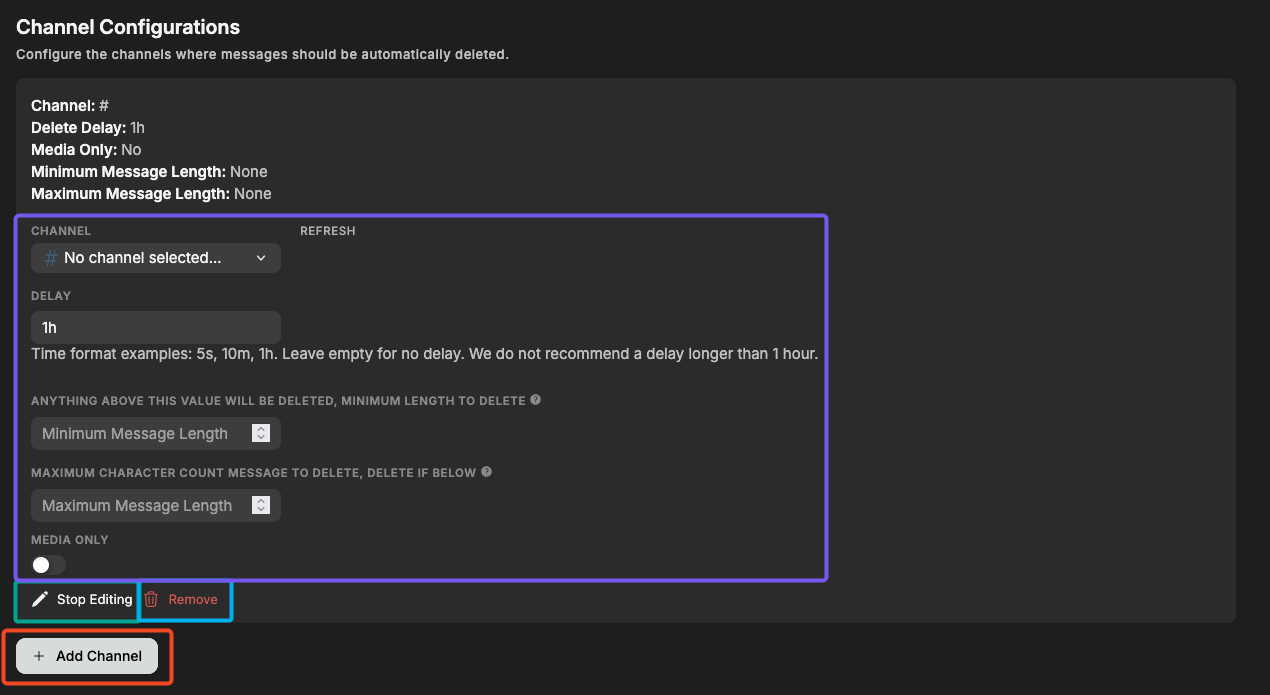
Above is the main configuration screen for Auto Delete Messages.
- Add Channel (red): Add a channel to the auto-delete list.
- Start/Stop Editing (green): Open the editor for that channel.
- Remove (blue): Remove the configuration for that channel.
Free servers can setup up to 2 channels and Premium servers up to 20!
Editing a Channel
When you click Start Editing, you can set:
Delay
How long the bot should wait before deleting a message.
Examples:
30s5m2h
Minimum Length
Delete messages longer than this value.
Useful for channels that should only contain short comments.
Maximum Length
Delete messages shorter than this value.
Useful for removing spam like “?”, “hi”, “ok”, or emojis.
Media Only
If enabled, only deletes messages that contain:
- Images
- Videos
- Attachments
- Etc.
Frequently Asked Questions
Do pinned messages get deleted?
Yes. Pinning a message does not exclude it.
Does the bot delete its own messages?
Yes, all messages are deleted if they meet the criteria.
Does this work with threads?
No, only main channel messages are filtered.
Does deleting messages log them?
If you have Action Logs enabled, deletions will appear there.
Need Help?
Join our Discord server for support, bug reports, and setup help.