Auto Moderation
Set up automated moderation rules to maintain order in your server. Auto Moderation allows you to automatically secure your server from spam, profanity and unwanted users. It's split up in 3 categories:
- Advanced Auto Moderation: Allows you to customize the rules, limits for different types of Automod like Spam, Mentions and caps.
- Discord Built-in Auto Moderation: Allows you to expand on Discord's default Automod with advanced actions to take when the users trigger it.
- Join Guard: Take actions on certain users and accounts when they join with customizable actions and filters, such as generated names, account creation date and more.
Let's take a look at all the forms of automod.
Advanced Auto Moderation
Automod is quite a complicated module, feel free to ask questions on our Discord Server!. Advanced automod is recommended for servers that want more control over their server. Want an easier setup? Use Discord Automod!
Advanced Automod has 11 different types of moderation to check. This includes things like Message Spam, Caps, or Blocked Links. Each of these is configured individually and consists of a few basic principles:
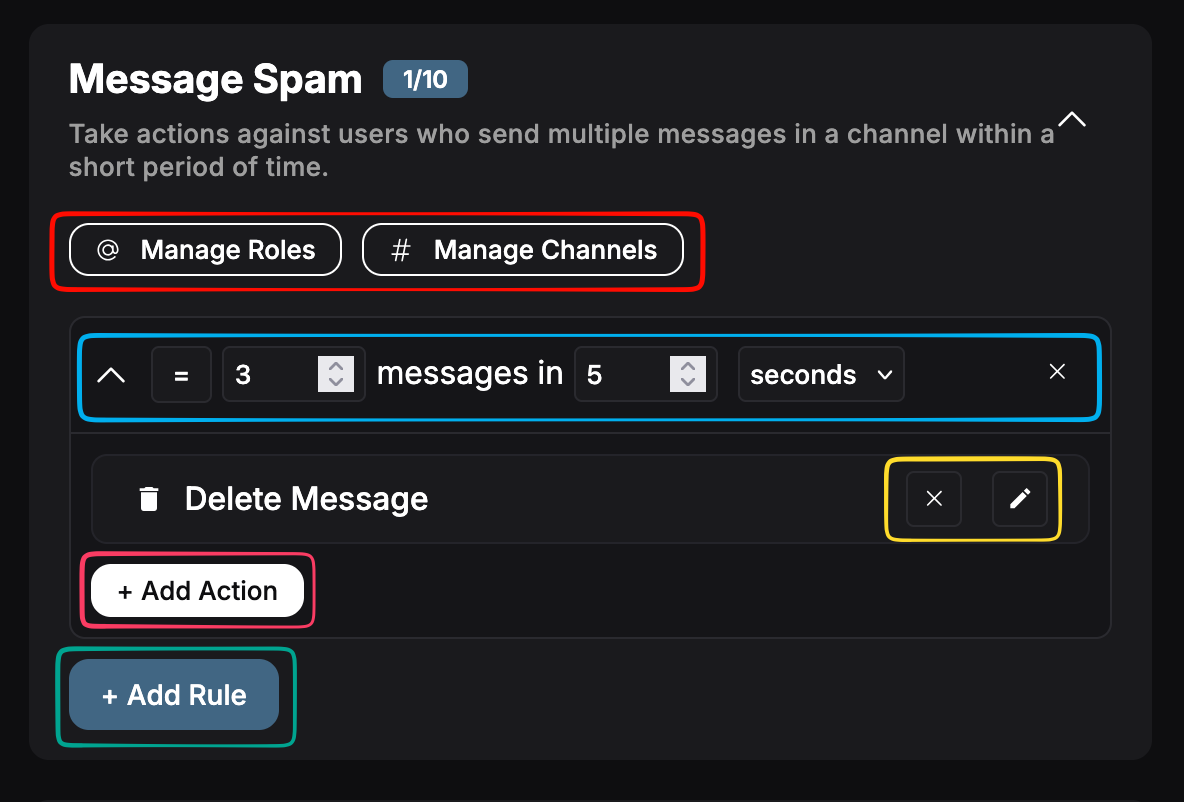
Configuration Overview
All modules are configured using a similar interface:
- Roles & Channels: configure the excluded or included roles and channels. Can be used to block or whitelist certain channels and roles. If set to 'included' only those roles/channels are accepted, excluded blocks only those roles/channels.
- Rule Configuration: configure the rule, all of these are configured in a similar way: '> 3 messages in 5 seconds', where you can choose between = or >=, change the messages requirement, and the timespan. You can add up to 10 of these rules.
- Action Configuration: delete or edit an action. Used to configure it's settings.
- Add Action: add an action to the rule.
- Add Rule: add a new rule to the automod type.
Each of these buttons is explained in more detail below.
Rules
The automod is based on rules. You can add a rule by clicking + Add Rule. There you can configure the settings for that rule, such as how many messages should be flagged within the timespan. You have the following options:
- Condition: Equals or greater than, trigger once or always if bigger than a certain count.
- Amount of Triggers: how many triggers are required for the rule to activate.
- Duration/Timespan: during what time do these triggers have to happen.
Actions
For each of these rules, you can add up to 10 total actions! These actions can do a lot of things to cleanup your server. The following actions are available: (*not all actions available for all automod types)
| Name | Description |
|---|---|
| Delete Message | Delete either the last or all of the triggered messages. |
| Send Message | Send a message in the channel, as reply or regular message. Can be deleted after sending. |
| Send DM | Send a message as DM to the user. Can be deleted after sending. |
| Add Reactions | Add a number of reactions to the message. |
| Add Role | Add role(s) to the user. |
| Remove Role | Remove role(s) from the user. |
| Set Roles | Update all the user's roles to a new set of roles. |
| Report to Staff | Send a message to a staff channel with reason to notify staff. |
| Warn User | Give a (temporary) warning. |
| Kick User | Kick user from server. |
| Ban User | (Temp)ban user from server. |
| Timeout User | Timeout user on server. |
All options can also be delayed up to 5 minutes.
Channels & Roles
Automod will ignore the users with Administrator, Manage server or Manage Messages permissions.
You can configure the roles and channels that are blocked or included for the automod type. You can either:
- Exclude channels/roles. Automod checks all channels/roles except for these.
- Include channels/roles. Automod checks no channels/roles, only these.
This is configured in the popup, and will be saved automatically when closing.
Links, words & Caps Filters
Some of these rules have an additional setting: word/link groups. These can be configured by clicking on the button within the rule. It will open a popup, where you can add words or links to the filter, as seen below. You can also choose (for some) block or allow all others.

For the caps filter, you can also choose the minimum message length and a caps percentage that will trigger the rule, as seen below.

Discord Built-In Auto Moderation
Discord Automod allows you to attach actions when a user generates alerts from Discord's automod. It works in a similar way to Advanced Automod. Let's go over the principles from this form of automod:
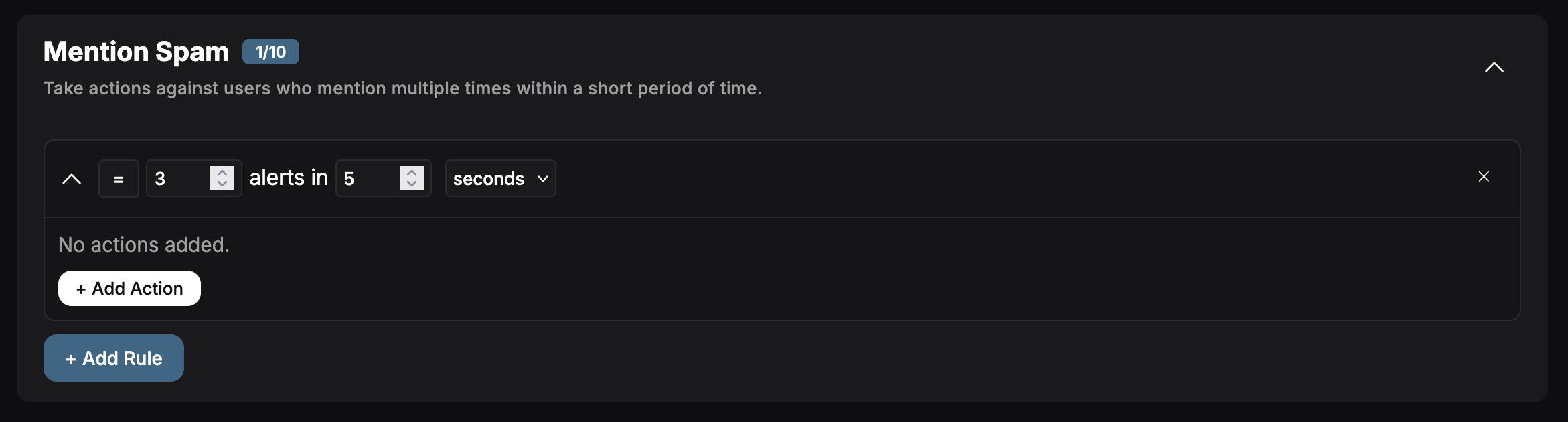
In order for these functions to work, you need to enable the Built-In moderation rules. Don't know what we're talking about? Read more here.
Rules
The automod is based on rules. You can add a rule by clicking + Add Rule. There you can configure the amount of alerts within the timespan the user needs to trigger the actions. Available options:
- Condition: Equals or greater than, trigger once or always if bigger than a certain count.
- Amount of Alerts: how many alerts are required for the rule to activate.
- Duration/Timespan: during what time do these triggers have to happen.
Actions
For each of these rules, you can add up to 10 total actions! These actions can do a lot of things to cleanup your server. The following actions are available:
| Name | Description |
|---|---|
| Send Message | Send a message in the channel, as reply or regular message. Can be deleted after sending. |
| Send DM | Send a message as DM to the user. Can be deleted after sending. |
| Add Role | Add role(s) to the user. |
| Remove Role | Remove role(s) from the user. |
| Set Roles | Update all the user's roles to a new set of roles. |
| Report to Staff | Send a message to a staff channel with reason to notify staff. |
| Warn User | Give a (temporary) warning. |
| Kick User | Kick user from server. |
| Ban User | (Temp)ban user from server. |
| Timeout User | Timeout user on server. |
All options can also be delayed up to 5 minutes.
Join Guard
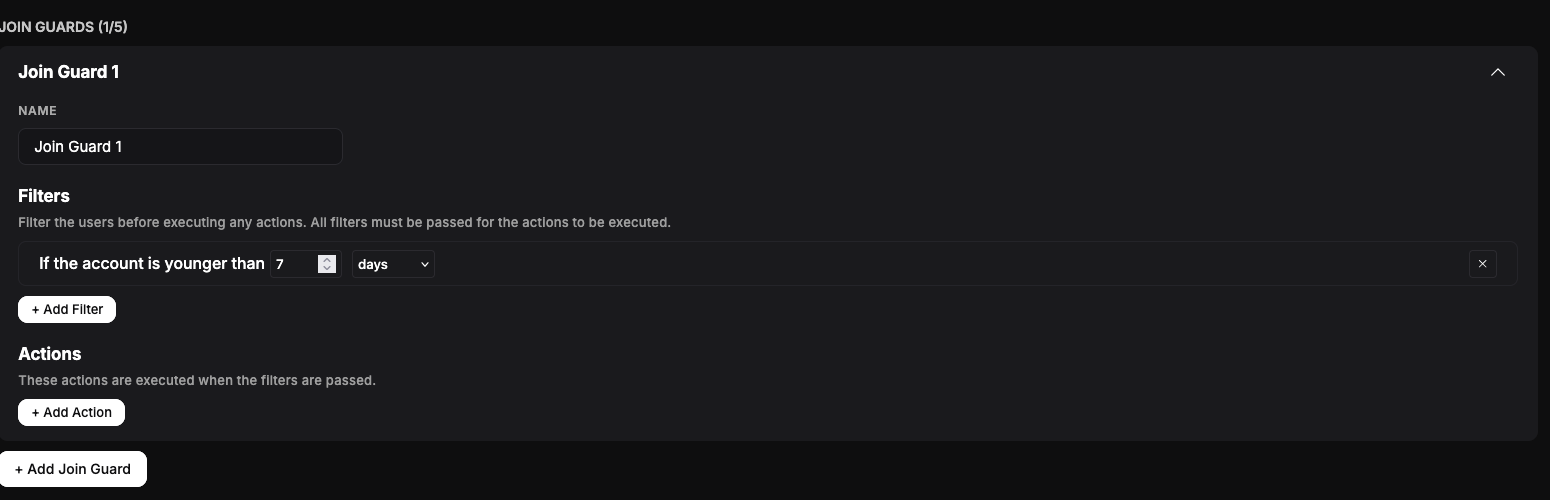
Join Guard allows you to automatically take action when users join your server based on specific account or profile characteristics. This helps protect your server from raids, bots and suspicious accounts.
Overview
A Join Guard consists of:
- Filters: What to check when a user joins
- Actions: What to do if ALL those filters are passed
You can create multiple Join Guards, each with their own logic and actions.
Filters
You can configure one or more filter per Join Guard. If all filters are met, the actions will be executed.
Available filter types:
- Account Younger Than: Triggers if the account is newer than a specified duration
- Account Older Than: Triggers if the account is older than a specified duration
- No Avatar: Triggers if the user has no profile picture
- Generated Name: Detects usernames that look automatically generated
- Name Contains: Triggers if the username contains specific words
- Guild Tag: Triggers if the user has certain tags in their profile
- Unverified App: Detects accounts created via unverified applications
Some filters (like account age or name contains) allow additional configuration such as duration or word lists. This is done via a popup, same as Words & Lists from Advanced Automod,
Actions
If the conditions are met, the following actions can be executed:
| Name | Description |
|---|---|
| Send DM | Send a message to the user |
| Add Role | Add one or more roles to the user |
| Remove Role | Remove roles from the user |
| Set Roles | Replace all roles with a new set |
| Warn User | Give the user a warning |
| Timeout User | Temporarily restrict the user |
| Kick User | Remove the user from the server |
| Ban User | Ban the user (optionally temporary) |
| Report to Staff | Notify staff in a configured channel with a reason |
All actions support optional delays, allowing you to wait before executing them.
How it works
When a user joins your server:
- All enabled Join Guards are checked
- Filers are evaluated
- If the conditions pass, the configured actions are executed
This allows you to create anything from simple protections (like blocking new accounts) to more advanced systems combining multiple checks.
Example
Example Join Guard:
- Filter: Account younger than 1 day
- Filter: No avatar
- Action: Timeout user
- Action: Report to staff
This will automatically detect suspicious new accounts and take action immediately.
Join Guards are powerful and flexible, and are especially useful for preventing raids and filtering out low-quality or automated accounts.
Need Help?
Join our Discord server for support, bug reports, and setup help.